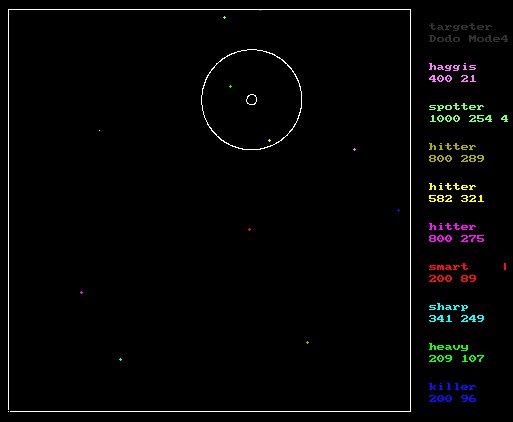
In the game of Robots, you do not take an active part in the action. instead, you write a program. This program controls how your robot acts (and reacts). The game is played in a square 400x400 arena. The robots sit in tanks, which have a gun facing the same direction they are moving in. They also have access to a radar, allowing them to see incoming bullets, and enemy tanks.
This is how it looks while the robots fight. Their stats are down the right hand side (The two numbers are shield strength and heading). The little blobs are the tanks, and that double circle is an explosion. Erm, the graphics are really good, aren't they? :)
For more information, here are the docs for Robots:
Robots file

Heres a list of the assembly commands, there opcodes and how to use all
 the progs.  Theres a dir of robot files (.rbt) and the source for them
  (.ska).
PS - the commands come after the intro bit - you should read the intro bit
twice - before and after you read about the command set.

  First a note on how a file should look:

        At the top of the file are 8 digits placed on seperate rows (the
        examples are all 3's):

 3
 3
 3
 3
 3
 3
 3
 3

        I know it looks ugly, but these are the robots stats.  Reading top to bottom
        they are:

        1 Speed
        2 Turning speed
        3 Bullet range
        4 radar range
        5 bullet speed
        6 armour
        7 regeneration   (robots regenerate when stationary (not turning or moving)
        8 damage         (damage taken sets raiusof explosion - closer to centre=more damage)

         You can assign 50 points in total to your robot, and a maximum of ten per stat\
         (Cheating robots WILL be terminated!)


        After these the file should be a list of codes like this


 ldv0000000000001
 sav0000000000001
 mnc0000000001000


 NOTE:  3 char opcode followed by 13 char operand - look at example .ska
 files if you dont get it from this.

 Commenting:

 simply type the text to the right of the codes.  Do NOT go beyond 80 characters
 per line!

 lab0000000000001
 jmp0000000000001     will do an infinite loop!


 Commands:

 Conventions:

        for most commands the last letter is important:

          if it end in a 'v' (ldv, sav, gov) then the operand refers
          to a memory location (youve got about 128 to play with)
          when using such commands, the memory ranges from 1-128, and
          if you refer to location 0, then the memory location is
          substituted for the top of the stack.
           therefor:

           ldc0000000000002
           psh0000000000000
           gov0000000000000
           pop0000000000000

           would load the accumulator with a 2, push it onto the stack,
           start the robot moving for the stack length (i.e. 2), then pop
           the stack.

         a 'c' ending means constant, i.e. the operand is treatied as
         its value:

         ldc0000000000002

         would load the accumulator with a 2

         am 'a' ending usually refers to the accumulator, as in the result
         is stored there.

         <operand> refers to the 13 digits after the command

         the operand MUST be 13 characters long.  It is a numeric value,
         excepting all digits (0-9), decimal points '.' and 'E' notation.
         It will also except binary using '%' and hex using '$', and PI:

         example operand (using adc as the command)

         adc0000000000013              add 13
         adc-000000000013              add -13
         adc0000000005e13              add 5 * 10^13
         adc-000000005e13              add -5 * 10^13
         adc000000005e-13              add 5 * 10^-13
         adc-00000005e-13              add -5 *b 10^-13
         adc00000000000pi              add pi
         adc%100101101101              add binary 100101101101
         adc$000000ffa010              add hex ffa010


         stack has about 64 entries

         A bit about turning and moving.
         When you tell the robot to move, he starts moving, and will stop
         when he reaches the specified distance.  THE PROGRAM FLOW CONTINUES!
         If you want the 'bot to move, and program flow to halt till he's done
         it, this code will work:


         goc0000000000100       start moving
         mva0000000000000       check to see if were still at it
         bns0000000000001       jump back to mva if were still at it (acc=0)

         course, this boils down to:

    You might think this is a stupid way to do it, but it
    does mean you can move and turn and fire at the same time!

    Coordinate system:

    The arena is a 400x400 square, the origin being in the bottom left,
    and angles are measured from the horizontal, 0 pointing right, rotating
    anti-clockwise, so 90 points up, 180 left and 270 down.


 memory stuff:

 ldv         load the contents of memory location <operand> into the
             accumulator

 ldc         loads the accumulator with the value <operand>

 sav         stores the contents of the accumulator in the mem location
             <operand>

 psh         pushes the accumulator contents onto the stack

 pop         pops the stack (i.e. removes top item)


 simple arithmetic:

 adv         adds contents of mem loc <operand> to accumulator

 adc         adds value of <operand> to accumulator

                these all work the same way, so I cant be arsed with
              the typing. <acc>=accumulator <op>=<operand> <mem>=memory loc
              for <operand>

 mnv          <acc>=<acc>-<mem>
 mnc          <acc>=<acc>-<op>
 mlv          <acc>=<acc>*<mem>
 mlc          <acc>=<acc>*<op>
 dvv          <acc>=<acc>/<mem>
 dvc          <acc>=<acc>/<op>


other maths stuff: (unless specified, all these results go into the accumulator)

 inv    -     does an INT on the <mem> (i.e., turns 3.4 to 3)
 inc          does an INT on the <op>
 mdv    -     does a MOD on the <mem>
 mdc          does a MOD on the <op>
 rnv    -     gives random number between 0 and <mem>
 rnc           "      "     "       "     0 and <op>
 txv    -     puts  the x-coord for robot into the <mem>
 txa            "    "     "      "   "    "    "  <acc>
 tyv    -               y-coord                    <mem>
 tya                       "                       <acc>
 frv    -     if  you are able to fire, puts a 1 into <mem>, else puts 0
 fra                                      ditto for   <acc>
 pwv    -     gives a readout of your current power (armour) - percentage <mem>
 pwa                 ditto for <acc>
 mvv    -    same kinda idea as frv/fra, except this tells if you can -
 mva         start moving in current direction (0 means your still moving

 msv    -    set move speed to <mem>.  If <mem> above max speed, resets to max.
 msc    -    ditto for <op>

 tsv    -    same as msv, except does it for turn speed (using <mem>)
 tsc    -    same using <op>
                                                  from last call)
 gov    -    move <mem> distance in current direction
 goc          "   <op>   "       "     "      "
 shv    -    shoot <mem> distance in current direction
 shc           ditto for <op>
 fcv    -    returns your current facing (0-359) into the <mem>
 fca                               ditto for <acc>
 tlv    -    turn left <mem> degrees
 tlc          "    "   <op> degrees
 trv    -      same as turn left, cept of course, -
 trc           you turn right
 tnv    -   returns whether you can start turning or not - <mem>
 tna                   ditto for <acc>
 stp    -   STOP all current moving and turning

 scanner :

 scv        scan arc of <mem> degrees in facing direction
            If no 'bot found, <acc> holds a 0
            else, <acc> holds the ID of nearest 'bot, and
            the top of the stack holds its range.

            *NOTE* once finished with range, remember and POP
            the stack!

 scc    -   same as scv, but uses arc of <op> degrees

 riv    -   puts your radar id (one delivered when you are hit by radar)
            <mem>

 ria    -   ditto to <acc>

 igv    -   ignore radar id <mem>.  id in <mem> is put on ignore list
            radar will then act as if tank with that is does not exist

 igc    -   same for id <op>

 nrv    -   nore radar id <mem>.  I.E. remove id <mem> from radar ignore list.
            Makes tank id visible to radar.

 nrc    -   nore radar id <op>. same as above, except does it for id <op>

 ilv    -   puts the number of id's in the radar ignore list into <mem>.
            If you are ignoring 3 tanks, then 3 will go to <mem>

 ila    -   same, except goes into <acc>


 more maths:

 snv         Im sure you know what the 'v's and 'c's mean, so Ill just name
 snc    -    the functions - they all go into the accumulator- this is SINE
 asv         ASINE
 asc    -
 csv         COS
 csc    -
 acv         ACOS
 acc    -
 tnv         TAN
 tnc    -
 atv         ATAN
 atc    -
 pwv         raises <acc> to the power of <mem>
 pwc    -                                 <op>
 exp         Exponential <mem>
 log    -    Natural log <mem>
 sqv         Square root <mem>
 sqc    -               <op>


 comparitors:

 in all cases, the <acc> is compared against the <mem> or <op>, <acc> on
 left.  If true 1 is stored in <acc>, else 0 stored

 ==v         <acc> equal to <mem> ?
 ==c    -                   <op>?
 <<v         <acc> < <mem>
 <<c    -            <op>
 >>v               >
 >>c    -
 <=v             < or =
 <=c    -
 >=v             > or =
 >=c    -
 <>v            not =
 <>c    -
 &&v            if <acc> is non-zero and <mem> is non-zero
 &&c    -                                <op>
 ||v                        <acc>    or  <mem>
 ||c    -                   <acc>    or  <op>
 !!v            if <mem> is non-zero, puts a 0 in <acc>, else 1 in <acc>
 !!a    -       "  <acc> "   "         "    "" "    "     "  "  "  "


 Jumps:

 jst            if <acc> is non-zero then jump (jump set)
 jns    -       if <acc> is zero then jump     (jump not-set)
 jmp            jump anyway!
 jsr    -       Jump to sub routine.  Same as jmp, except once a RTN is hit
                control goes back to where ti left of (i.e. a GOSUB)
 rtn    -       return from sub routine - RETURN

 bst    -       move back <op> lines if <acc><>0
 bns            move back <op> lines if <acc>=0
 bck    -       move back op lines

 fst    -       move forward <op> lines if <acc><>0
 fns            move forward <op> lines if <acc>=0
 fwd    -       move forward <op> lines


 comms:

 Yes - the robots can talk to each other!

 sid    -       Sets the robots personal ID.  Different from ID returned
                by radar.  This is the id used when you want to talk to
                another robot.  If you dont call this command then the id
                is random (1-10000).  Call and its set to <op>

 idv    -       return robots personal ID into <mem>
 ida    -       return above to <acc>

 hrv    -       hear.  if there is a message waiting on the message queue,
                it is copied to <mem>. else 0 is copied. Message is also
                removed from queue.

 hra    -       does above, except to <acc>

 tkc    -       talk to <op>.  Tells robots with ID <op> message in <acc>
 tkv            ditto, except tells it to robots with ID <mem>
 yll            yells message in <acc> to all robots

 drv    -       check to see if message weas a direct message.  If message
                was sent using tkc or tkv then returns 1 to <mem>.  if yll
                was used, 0 goes to <mem>
 dra    -       does above into <acc>

 tfv    -       is the message queue full? (It can only hold 20 messages)
                If so, 1 goes to <mem>, else 0 to <mem>
 tfa    -       ditto, but to <acc>

 dmo    -       sets the robots direct message only flag to <op>.  If this
                flag is non-zero then robot will only recieve direct messages -
                i.e. no yll will get through


 Timing:

   There is a clock that keeps the number of ticks into the game.  you can
   refer to it with:

 tmv    -       Time on clock goes into <mem>
 tma             "    "   "    "     "  <acc>


 Number alive:

   These two commands report the number of robots still alive in the game

 alv    -       puts number of robots still alive into <mem>
 ala            ditto, into <acc>


 debugging flags:

     these 2 commands are for debugging.  They load into a special
     var held by the robot, and if its non zero, its contents are displayed
     next to the robots facing in the game. (gives you a value readout)

 dsv    -   displays <mem>
 dsc        displays <op>


 ----------------------------------------------------


        Thats the command set.  Bastard eh?

        Heres a run down of the given programs:

        (oh, .ska stands for Snell-King Assembly - shite eh?)
        ( skatr is Snell-King Assembly To Robot)
        ( .rbt is short for robot - surprise!)

        skatr      -    assembler
        view       -    view assembled progs
        robots     -    the game

        How to use:


        skatr:

        on command line:

                SKATR robot.ska robot.rbt

        will assemble file robot.ska to file robot.rbt


        view:

        on command line:

                VIEW robot.rbt

        will give you the programs lines numbers, opcodes and operands
        + synonyms (i.e. the three letter commands)


        make:

        on command line:

                make makefile.mkf

        where makefile.mkf is a text file containing the names of ska files:

        say you had in a dir,   foo.ska, bar.ska, baz.ska, bob.ska
        make a file foobar.mkf which consists of the four lines:

        foo
        bar
        baz
        bob

        typing make foobar.mkf at the prompt will assemble all four progs


        robots :

        on command line:

                robots bot1.rbt bot2.rbt bot3.rbt ......

        runs the game.

        the game will run 15 tanks (limited by colours), but you can usually
        only fire about 10 or 11 on command line (10 fits nicely on screen)

        In game:

        0-9  - set game speed.

        0 fastest, through to 9 where you have to push a key to advance a tick

        d  -  toggle debugging.  With debugging on, x/y coords and current line
        number are displayed, as well as a tick count in the bottom left.

        ctrl-break quit